Learn how to create professional reaction videos instantly using just your iPhone and the Detail app, with no manual editing required.
Zay from Detail walks through a streamlined approach to creating reaction videos that eliminates the tedious editing process most creators struggle with. Instead of juggling multiple apps and manually syncing clips, this method lets you produce polished content in seconds using just your iPhone.
The process starts with finding content you want to react to. When you come across a TikTok or other video that sparks your interest, you simply copy the link. Opening the Detail app, you paste that link directly into the interface, and the video loads right inside the app. No downloading, no importing, just instant access.
From the layout menu, you can select from several preset options that determine how your reaction appears alongside the original content. The beauty of this approach is that you don't have to drag clips into a timeline or manually sync anything. The app handles all the technical setup automatically.
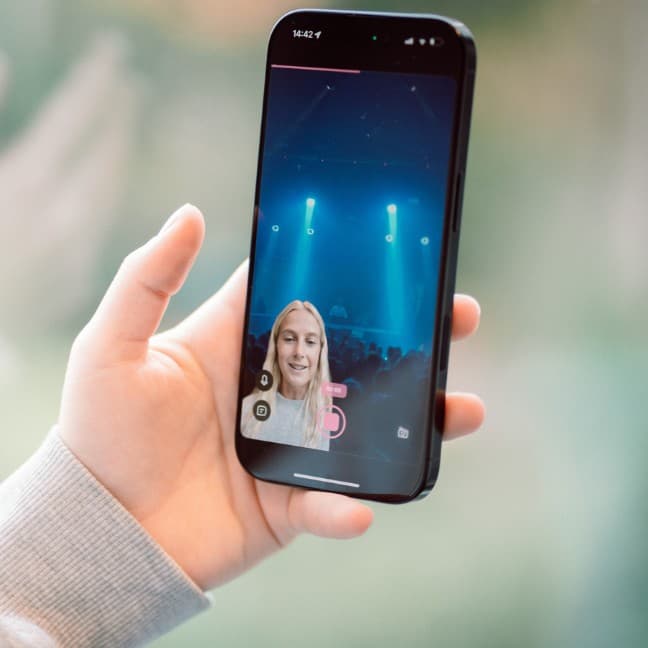
Available layout options include picture in picture, circle overlay, half and half split screen, or a one third layout. Each serves different content styles and aesthetic preferences. You can also position yourself in any corner of the screen, choosing whatever placement works best for the specific video you're reacting to.
Once your layout is set, you hit record and start reacting. If you have something scripted, you can use the built in teleprompter feature. If you prefer a more spontaneous approach, you can speak freely. Either way, both your face and the video are captured simultaneously, perfectly synced from the start.
Detail auto generates captions and even fixes your audio automatically.
When you finish recording, the app takes over the post production work. Captions are generated automatically, saving you from manual transcription. The audio gets cleaned up and enhanced without any input needed from you. What used to take hours of editing now happens in the background while you move on to your next piece of content.
This workflow removes the friction that stops many creators from making reaction content consistently. The technical barriers that once required video editing knowledge or expensive software are now handled by a mobile app. You can create, edit, and publish professional looking reaction videos entirely from your phone, making it possible to respond to trending content while it's still relevant.
The flexibility in layout options means you're not locked into a single aesthetic. Different videos call for different presentations, and being able to switch between styles quickly keeps your content fresh and appropriately formatted for each piece you react to.