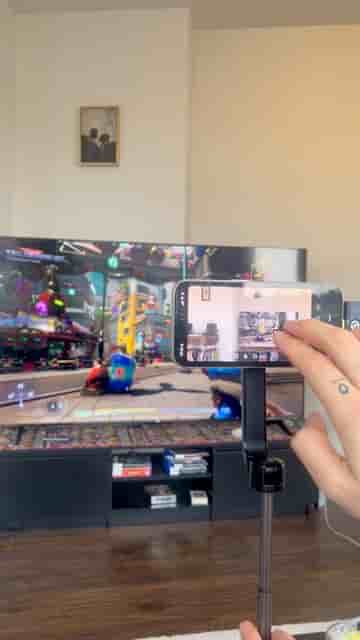
Streaming PS5 to Twitch and Kick with no capture card takes a phone, a tripod, wireless mics, and the Detail app. Live in under five minutes.
No capture card. No dedicated PC. No rats' nest of HDMI cables running to a complicated encoder setup. Streaming PS5 gameplay to Twitch or Kick takes a phone, a tripod, and a wireless mic — and that's genuinely the whole list.
The setup is exactly as minimal as it sounds. Mount your phone on the tripod, connect the mics, and position the phone between you and the TV. That physical placement is the key move: the phone's back camera points at the screen, and you zoom in just enough that the TV fills the entire frame. Your face ends up in a picture-in-picture overlay, which looks cleaner for gaming than a straight side-by-side split.
Phone, tripod, wireless microphones. Nothing fancy.
Open the Detail app, start a new project, and head to Layout. Picture-in-picture is the right pick here — it keeps the gameplay front and center while still showing your reaction. From there, tap Source and dial in the zoom on the back video until the TV fills the frame cleanly.
When everything looks right, tap the three dots and hit Livestream. Detail lets you connect to two platforms at once, so you can go live on Twitch and Kick simultaneously, or swap in YouTube, or whatever combination you want. Paste your stream keys, tap Go Live, and you're broadcasting.
"You can pick two platforms like Twitch, YouTube, Kick, whatever you want, and paste the stream keys."
The friction that keeps most people from streaming console gameplay is the hardware barrier: capture cards, encoding rigs, and software that takes an afternoon to configure. Pointing a phone at your TV sidesteps all of it. The picture quality won't match a dedicated capture card setup, but it gets you live in under five minutes, which is the thing that actually matters when you're starting out.
The picture-in-picture layout Detail provides does a lot of the visual work automatically. You're not manually compositing scenes or managing multiple sources in a broadcasting dashboard — you pick a layout, frame the shot, and go. For anyone who's been putting off streaming because the setup felt too intimidating, this is the version that removes the excuse.
This is the easiest way to start streaming.