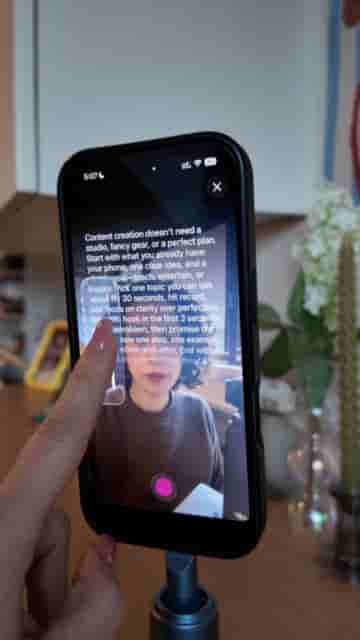
Detail's iPhone app combines a teleprompter, script editor, and auto-captions in one place, making solo video filming significantly less painful.
Forgetting your script mid-take is one of the most frustrating parts of filming solo content. You lose your train of thought, your eyes drift, and suddenly you're doing take after take just to get through a 60-second clip. Detail, a video app for iPhone, solves this with a built-in teleprompter that keeps your words front and center while you record.
Once you download Detail, head to Record Scripts. Paste your script directly into the app, and from there you have a few options to refine it before you ever hit record. You can add a hook, expand sections that feel thin, or trim anything that runs long. It's a simple editing step, but having your script tightened inside the same app where you'll film removes a lot of back-and-forth.
Paste your script, refine it inside the app, then record — all without switching tools.
With your script ready, adjust the scroll speed using the control on the left side of the screen. Text size is adjustable too, so whether you're filming close up or a few feet from your phone, you can set it to whatever feels natural to read without looking strained on camera. When everything is dialed in, hit record and go.
"You can even make the text smaller, bigger, whatever works for you."
After you finish recording, Detail handles captions automatically. Navigate to the captions section and the app generates them for you, no third-party tool or manual sync required. For anyone posting short-form video regularly, cutting that step out of the workflow adds up fast.
"Detail does this automatically."
If you're filming talking-head content on your iPhone and still relying on memorization or paper notes, Detail is worth trying. The teleprompter, script editor, and auto-captions together cover most of what makes solo filming tedious.