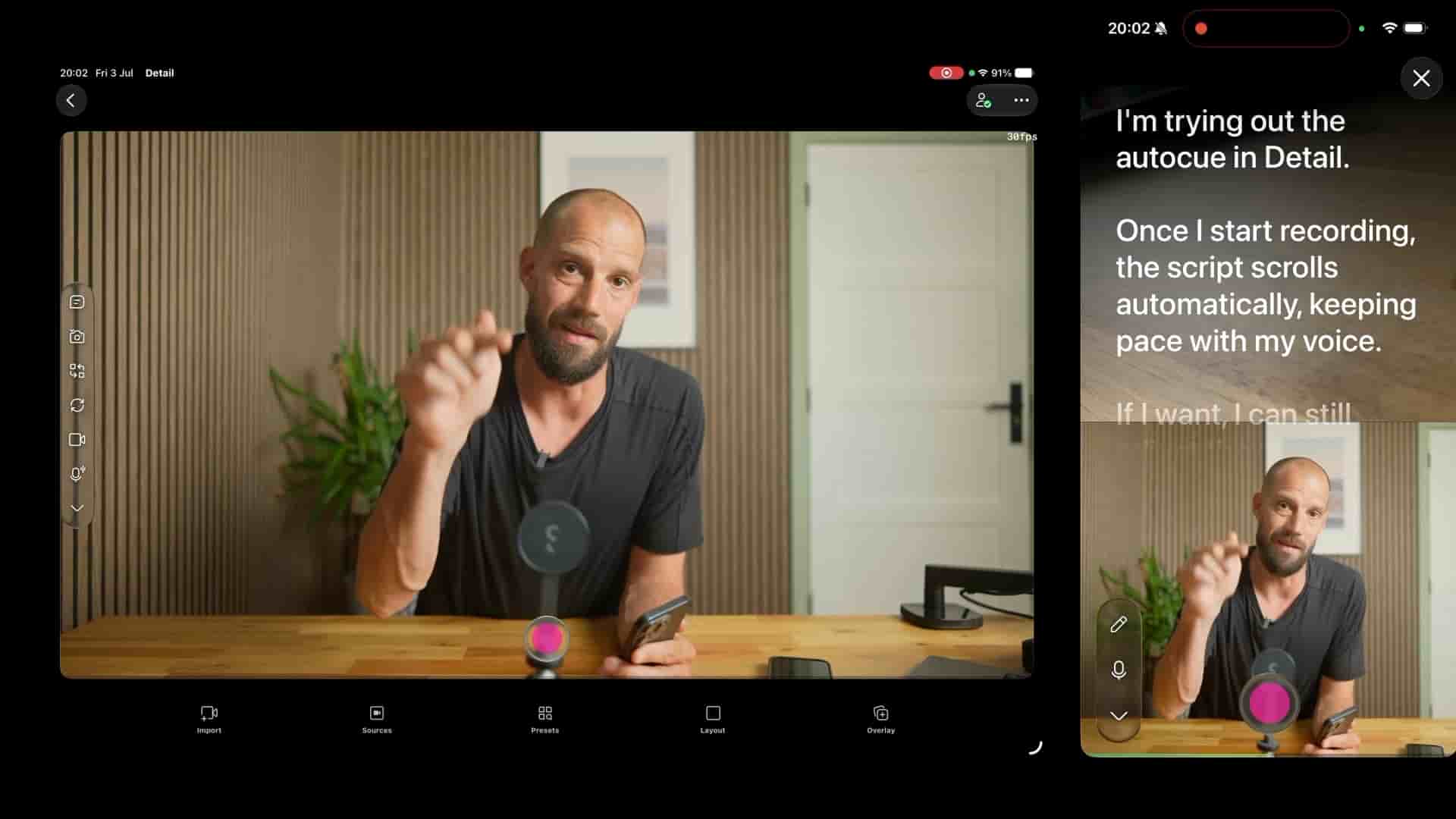
Frank from Detail shows how pairing an iPad teleprompter with a Sony A7 IV and Detail's multicam recording delivers pro-camera eye contact on every take.
A teleprompter setup that uses your iPad as the display and a Sony A7 IV as the camera sounds complicated, but with Detail it comes together in a few taps. I've been experimenting with this in my studio and the results genuinely surprised me.
The core idea is simple: an external teleprompter rig (the kind you can pick up on Amazon for anywhere from $50 to a couple hundred dollars) holds your iPad in a clamp in front of a one-way mirror. Your script scrolls on the iPad. A professional camera sits behind that mirror, shoots through it, and captures your face dead-on while you read. You're looking directly at the lens the whole time.
A $50 teleprompter rig plus an iPad plus Detail equals pro-camera eye contact on every take.
On iPad, Detail lets you connect an external camera as your recording source. I'm using the A7 IV here, which acts as a webcam over USB. Once that's connected, you start a new project in Detail and your external camera feed shows up immediately. From there, I also pulled in my iPhone on the same multicam session, switching to its rear camera so it could show the full studio setup as a second angle.
The multicam side of this took seconds to get running. Within a few taps, both feeds were live and I could switch between them to see how each angle looked.
When you place the iPad in the teleprompter clamp and switch to full-screen teleprompter mode, the text appears flipped. That's expected — the mirror reverses it. What you do is open the teleprompter menu inside Detail and tap the mirror button. The script flips back to readable, you bump up the font size until it's comfortable, and you're set.
"Open the menu and then hit the mirror button and there you go."
It's a small thing, but easy to miss the first time you try this live. I learned that the hard way.
Detail has a built-in teleprompter that works on-device with your iPhone's selfie camera. It's genuinely useful and requires zero extra hardware. But the selfie camera is the selfie camera. The moment you route an external pro camera through Detail and place your iPad in a physical teleprompter rig, the image quality jumps to a different level entirely.
I think this is a fantastic hack.
Looking at the two feeds side by side, the difference is obvious. The pro camera feed is sharp, the framing is controlled, and you still get the eye-contact advantage of a teleprompter because the lens is sitting right behind the mirror you're reading through.
If you're recording podcasts, tutorials, or any kind of scripted content where you want to look confident and prepared, this combination handles it well. You get your script scrolling at your own pace, a multicam session running across multiple devices, and a camera quality that holds up at full screen. I previewed the reel layout inside Detail and was genuinely surprised by how clean it looked straight out of the setup, before any editing.
The built-in teleprompter in Detail is the right starting point for most people. But if you want to step up the image quality without giving up the convenience of reading from a script, the iPad-plus-external-camera route inside Detail is worth trying. The hardware cost is low, the setup is faster than it looks, and the results speak for themselves.
You don't need to invest in an external teleprompter. Detail has a built-in one. But when you do, the upgrade is real.